03 — ARTWORK
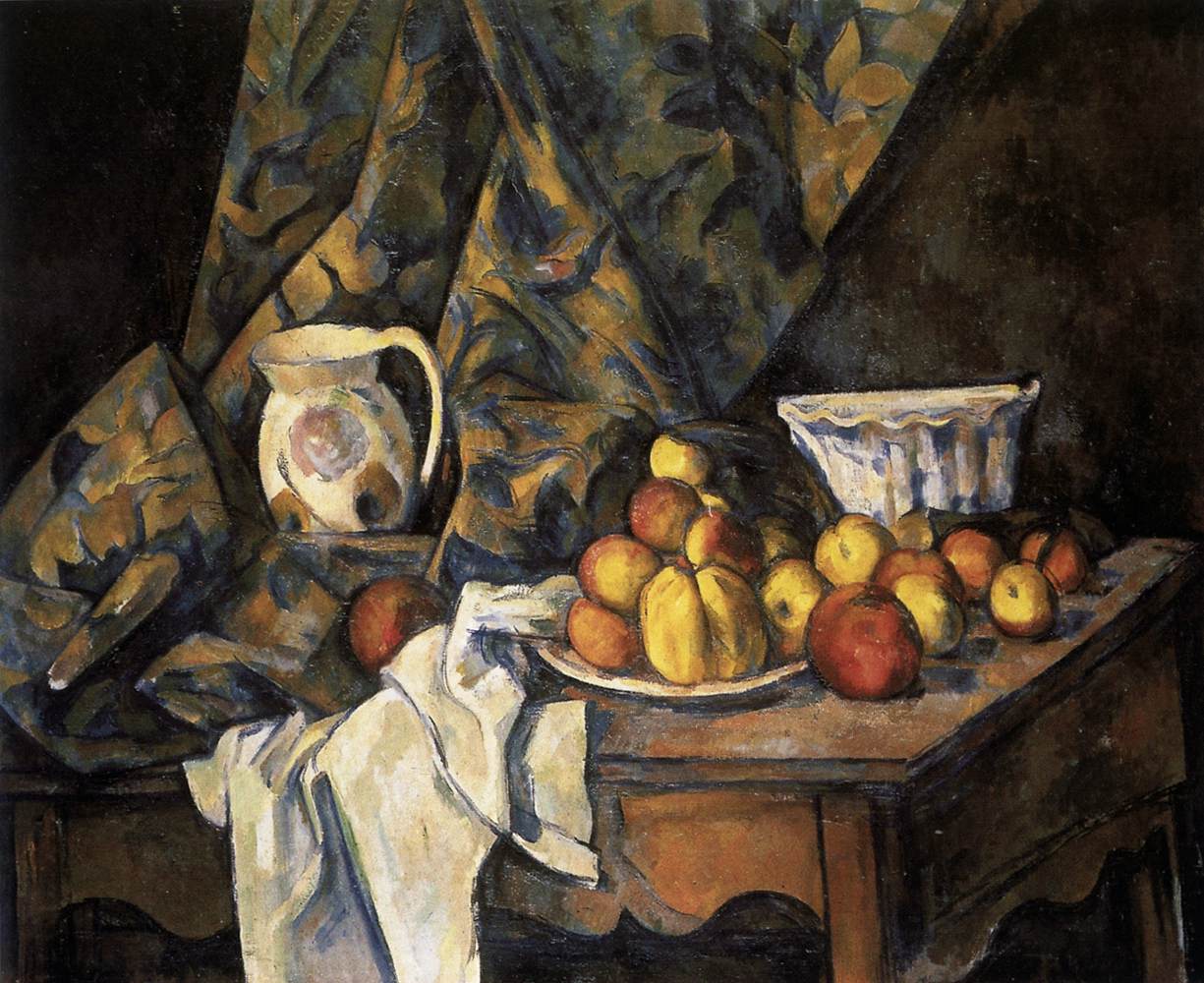
Still-Life with Apples and Peaches
- MEDIUM
- Oil on canvas, 81 x 100 cm
- TYPE
- Still-Life
PALETTE
HOVER OR TAP A SWATCH FOR NAME, SHARE AND HEX. SAMPLED FROM THE IMAGE — INDICATIVE, NOT A PIGMENT ANALYSIS.
DEVELOPMENT BUILD — NOT FOR PUBLIC USE. CONTRIBUTE ON GITHUB.
03 — ARTWORK
PALETTE
HOVER OR TAP A SWATCH FOR NAME, SHARE AND HEX. SAMPLED FROM THE IMAGE — INDICATIVE, NOT A PIGMENT ANALYSIS.
COMMENTARY
UNDERLINED TERMS ARE DEFINED IN THE GLOSSARY.
Still-Life with Apples and Peaches c. 1905 Oil on canvasA woven cloth used as a support for painting. The best-quality canvas is made of linen; other materials used are cotton, hemp, and jute. It is now so familiar a material that the word 'canvas' has become almost a synonym for an oil painting, but it was not until around 1500 that it began to rival the wooden panel (which was more expensive and took longer to prepare) as the standard support for movable paintings (the transition came later in Northern Europe than in Italy). Canvas is not suitable for painting on until it has been coated with a ground, which isolates the fabric from the paint; otherwise it will absorb too much paint, only very rough effects will be obtainable, and parts of the fabric may be rotted by the pigments. It must also be made taut on a stretcher or by some other means., 81 x 100 cm National Galleryan upper story, similar to a tribune, running along the side of a building and open on one side to the interior; in a church (basilica) above the side aisles, over the ambulatory (central-plan building) and also over the west end. The gallery was used to keep certain groups of worshippers apart (women, noblemen). of Art, Washington
Cézanne developed a completely new way of depicting objects in space. He reinvented still-lifes on the basis of their two-dimensionality, and used purely artistic means to give them depth. He used dual viewpoint to show objects from two different viewpoints. He avoided linear perspectiveThe method of representing three-dimensional objects on a flat surface. Perspective gives a picture a sense of depth. The most important form of perspective in the Renaissance was linear perspective (first formulated by the architect Brunelleschi in the early 15th century), in which the real or suggested lines of objects converge on a vanishing point on the horizon, often in the middle of the composition (centralized perspective). The first artist to make a systematic use of linear perspective was Masaccio, and its principles were set out by the architect Alberti in a book published in 1436. The use of linear perspective had a profound effect on the development of Western art and remained unchallenged until the 20th century. in his depictions of objects, he could paint them so that their size was in proportionin painting, sculpture and architecture, the ratio between the respective parts and the whole work. The following are important: 1. the Canon of Proportion, a mathematical formula establishing ideal proportions of the various parts of the human body. The unit of measurement is usually the relationship of the head to the torso (1:7 or 1:10); 2. the golden section, a line C divided into a small section A and a larger section B, so that A:B are in the same relationship as B:C; 3. the quadrature, which uses the square as a unit of measurement; 4. triangulation, which uses an equilateral triangle in order to determine important points in the construction; and 5. harmonic proportions, an analogy with the way sounds are produced on stringed instruments, for example an octave = 1:2 (the difference in pitch between two strings, one half the length of the other), a fifth = 2:3, a fourth = 3:4. o to their importance in the composition as a whole.
Cézanne set up all his still-lifes in his studio. Some of the objects he used are still in his last studio on the Chemin des Lauves in Aix. Apart from the fruit, many of the objects, such as jugs, pots and plates, frequently recur in his compositions. The pictures often include a dramatically billowing white tablecloth, giving the paintings a touch of BaroqueThe period in art history from about 1600 to about 1750. In this sense the term covers a wide range of styles and artists. In painting and sculpture there were three main forms of Baroque: (1) sumptuous display, a style associated with the Catholic Counter Reformation and the absolutist courts of Europe (Bernini, Rubens); (2) dramatic realism (Caravaggio); and (3) everyday realism, a development seen in particular in Holland (Rembrandt, Vermeer). In architecture, there was an emphasis on expressiveness and grandeur, achieved through scale, the dramatic use of light and shadow, and increasingly elaborate decoration. In a more limited sense the term Baroque often refers to the first of these categories. The development of the Baroque reflects the period's religious tensions (Catholic versus Protestant); a new and more expansive world view based on science and exploration; and the growth of absolutist monarchies. extravagance.
@online{wga-r2aed7284d73ce8,
  author       = {Krén, Emil and Marx, Daniel},
  title        = {Still-Life with Apples and Peaches by CÉZANNE, Paul},
  organization = {{Web Gallery of Art}},
  date         = {2026-09-08},
  url          = {https://beta.wga.hu/artists/czanne-paul-r7acc44883e4fc9/still-life-with-apples-and-peaches-r2aed7284d73ce8},
  urldate      = {2026-09-08},
  langid       = {english}
}
ACCESSED 2026-09-08. REPLACE THE AUTHOR FIELD WITH THE COMMENTARY AUTHOR WHERE ONE IS NAMED.


